
Your First Dojo App
In this tutorial, you'll create your first Dojo project from scratch and deploy it locally. By the end, you'll have a working game where you can spawn and move a character using a browser-based client.
What You'll Learn
- The structure of a Dojo project
- Basic Entity Component System (ECS) concepts
- How to start the development environment
- Deploying your first World contract
- Interacting with your deployed game
Step 1: Create Your Project
First, clone the Dojo Intro project, which implements a simple spawn-and-move game:
git clone https://github.com/dojoengine/dojo-intro && cd dojo-introNow open up the repo in your code editor and explore the project:
dojo-intro/
├── client/
├── contracts/
│ ├── src/
│ │ ├── systems/ # Game logic (Systems)
│ │ │ └── actions.cairo
│ │ ├── lib.cairo # Main Cairo entry point
│ │ └── models.cairo # Data models (Components)
│ ├── dojo_dev.toml # Dojo configuration
│ ├── katana.toml # Katana configuration
│ ├── Scarb.toml # Cairo configuration
│ └── torii_dev.toml # Torii configuration
└── README.md # Project readmeNote: Some files and directories are omitted for simplicity
Step 2: Understand the Contract Structure
Let's examine the key contracts/ files to understand what we're building:
Models (Entities & Components)
Look at contracts/src/models.cairo to see the data structures:
#[derive(Copy, Drop, Serde)]
#[dojo::model]
pub struct Position {
#[key]
pub player: ContractAddress,
pub x: u32,
pub y: u32,
}
#[derive(Copy, Drop, Serde)]
#[dojo::model]
pub struct Moves {
#[key]
pub player: ContractAddress,
pub remaining: u8,
}These models define:
- Position: Where each player is located (x, y coordinates)
- Moves: How many moves each player has remaining
The #[dojo::model] attribute tells Cairo that the struct is a Dojo model.
The #[key] attribute tells Cairo that player is the Dojo entity identifier for these components.
Contracts (Systems)
Open contracts/src/systems/actions.cairo to see the game logic:
#[starknet::interface]
pub trait IActions<T> {
fn spawn(ref self: T);
fn move(ref self: T, direction: Direction);
fn move_random(ref self: T);
}
#[dojo::contract]
pub mod actions {
// Implementation details...
fn spawn(ref self: ContractState) {
// Create a new player with starting position and moves
}
fn move(ref self: ContractState, direction: Direction) {
// Move the player and decrease remaining moves
}
fn move_random(ref self: ContractState) {
// Move the player randomly and decrease remaining moves
}
}These functions define the game's core actions:
- spawn: Create a new player at the starting position
- move: Move a player in a direction (up, down, left, right)
- move_random: Use the Cartridge vRNG to move in a random direction
Project Configuration
Open contracts/dojo_dev.toml to see the project's Dojo configuration:
[world]
name = "Dojo intro"
... additional project details
[namespace]
default = "di"
[env]
rpc_url = "http://localhost:5050/"
... additional environment details
[writers]
"di" = ["di-actions"]This configuration tells Dojo how to organize permissions when deploying the World.
Specifically, it defines di as the default namespace and permits the systems defined in actions.cairo to write game state.
Step 3: Start the Development Environment
Now let's get the development tools running. For detailed instructions on running Katana, Sozo, and Torii together in development, see the development workflow guide.
Here's a quick overview to get you started:
Terminal 1: Start Katana (Local Blockchain)
cd contracts && katana --config katana.tomlTerminal 2: Deploy Your World
cd contracts && sozo build && sozo migrateTerminal 3: Start Torii (Indexer)
cd contracts && torii --config torii_dev.tomlCongratulations! Your Dojo development environment is up-and-running.
Step 4: Launch Your Game Client
Now let's test your game! First, let's launch your game client:
cd client && pnpm install && pnpm run devYou should see:
# pnpm install
# Installation details ...
Done in 409ms using pnpm v10.6.4
# pnpm run dev
> client@1.0.0 dev /Users/kronosapiens/code/cartridge/dojo-intro/client
> vite dev
VITE v6.3.4 ready in 152 ms
➜ Local: https://localhost:5173/
➜ Network: use --host to expose
➜ press h + enter to show helpNow navigate to https://localhost:5173/ to reach the running client.
You should see a page which looks like this:
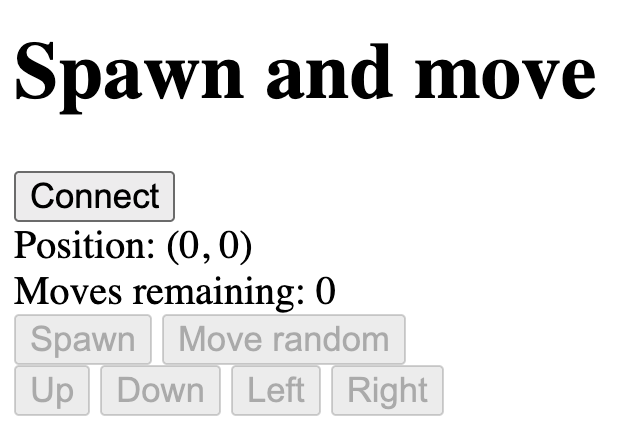
Click Connect to launch the Cartridge Controller log-in flow.
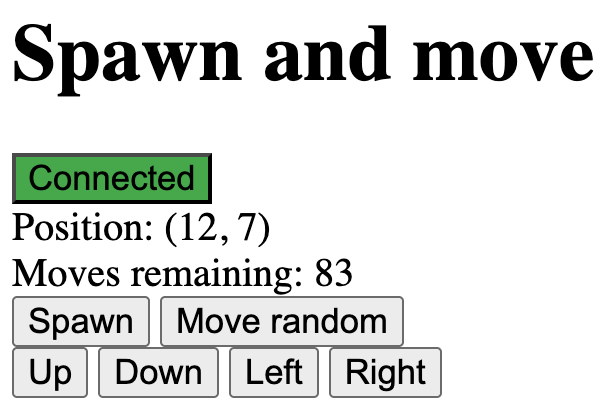
Once you have logged in with Controller, you should be able to spawn a character and move them around.
After a while, you should have something which looks like this:
Understanding What Happened
Let's break down what you just accomplished:
- Defined Models:
PositionandMovesstore data about each player - Implemented Systems: The
spawnandmovefunctions modify model data - Created a World: Your World contract acts as the central registry for all game data, logic, and access control
- Used the Toolchain:
- Katana provided a local blockchain
- Sozo managed compilation and deployment
- Torii indexed data and sent it to the client
Key Concepts
Entity Component System (ECS)
- Entities: Players in your game (identified by their address)
- Models: Data attached to entities (
Position,Moves) - Systems: Functions that operate on models (
spawn,move)
Dojo World
Your World contract coordinates everything:
- Registers all models and systems
- Handles permissions and authorization
- Provides a consistent interface for data access
Event-Driven Updates
When you execute a system, it emits events that Torii captures and indexes, which clients can subscribe to.
Next Steps
Congratulations! You've successfully:
- ✅ Understood basic ECS concepts
- ✅ Created and deployed your first Dojo project
- ✅ Used the core development tools
- ✅ Interacted with your deployed World
Ready to dive deeper? Continue to Understanding the Toolchain to learn more about the tools that make Dojo development possible.